

109: Seven Tools to Help You Do Your Best Work
Coaching for Leaders
Dave Stachowiak
4.8 • 1.6K Ratings
🗓️ 7 October 2013
⏱️ 44 minutes
🧾️ Download transcript
Summary
Technology is great, but only if it helps you work better. On this episode, I share 7 tools that I use and will help you get the most of our your time. I currently use them all daily in my work and I’m excited to share their benefits with you.
My three criteria for selection these tools:
- Cross-platform
- Not apps/tools that you already know everything about
- Clear business model
- Frees time to invest doing the things you are best at
- I currently use all of them
Highrise (highrisehq.com)
- The problem this solves: Trying to piece together everything someone has every told you in multiple places.
- Far less complex than traditional CMSs
- Manage relationships
- Track conversations
- Tag people for events, projects, etc.
- Track details (birthdays, family names, etc.)
- Integrates Twitter and LinkedIn
- Basic task management
- Tracks pending customer deals
- Free plan up to 250 contacts / 30-day free trial
- What will this help you do? Get stuff out of your head and manage lots of different relationships.
Basecamp (basecamp.com)
- The problem this solves: Re-doing the same work again and again and checking in to see if people have done stuff.
- Project management tracking
- Templates for projects
- Integration with a team
- No free version, but a 60-day free trial (no credit card), $20/month
TimeTrade (timetrade.com)
- The problem this solves: Spending countless hours going back and forth with people on times to schedule with you.
- You give TimeTrade calendar access (Outlook, Calendar, Google calendar) and it looks for free spots
- You have a link and people can schedule and cancel automatically
- Great for people who are outside your organization and don’t want to have any detailed access to your calendar
- Appointments show up automatically in calendar and by email
- One downside – you need to watch what is free in your calendar
- Free version is available, but I use the $49/year version
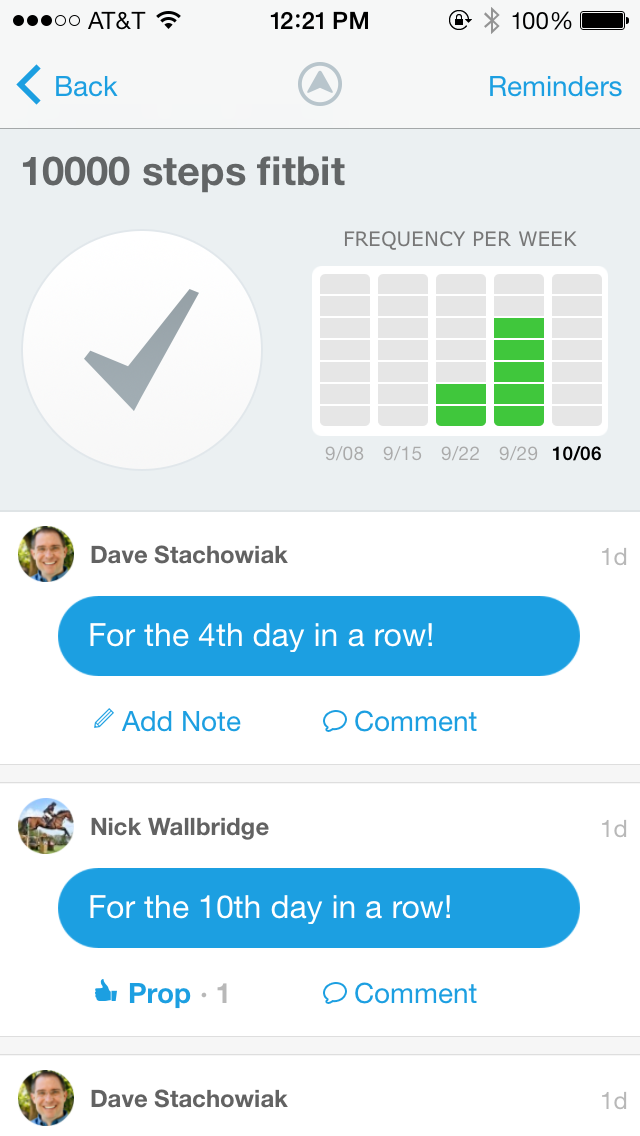
Lift (lift.do)
- The problem this solves: Keeps you on track for the daily habits that are important to you.
- Set habits in the system
- Track when you complete them
- Follow others and encourage others and get encouragement in return
- Example: Wake up at 5am
- It sends you little motivators by email on alerts on your phone
- This version is entirely free
- See screenshot below from my iPhone
Instapaper (instapaper.com)
- The problem this solves: Cool articles on the web distracting you from getting your work done
- Set up an account and install an extension in your browser
- See something you like? Hit the button on your browser and it saves it into your account.
- Read it later on the device you want to use. I use the Instapaper app on my iPad.
- I can then send it other places.
- Instapaper account is free, but the apps are a few dollars, depending on the device you use. Or, you can read on the web.
- Pocket is a another alternative, but I’m not clear on their business model.
Buffer (bufferapp.com)
- The problem this solves: Staying engaged on social media without having to be on social media all the time
- One of my goals this year – show up more online. But how, with limited time?
- Fill your queue with relevant things for the people who follow you
- Buffer will post them on your behalf at regular intervals
- Great way to feature the work of others – I do this especially with Twitter
- Free version available, but I use $10/month version
1Password (1password.com)
- The problem this solves: Not having to track all those passwords in your life and also limiting the ability of hackers to get access to your life
- Create unique passwords for every site you visit online
- Keep them all in one place, protected by a master password
- Login automatically from your browser
- Syncs across devices using Dropbox or iCloud
- Massive time saver and fantastic peace of mind
- Just this week, Adobe announced they had a breach of accounts
- $40-$80 depending on the version you buy
Discover More
Activate your free membership for full access to the entire library of interviews since 2011, searchable by topic. To accelerate your learning, uncover more inside Coaching for Leaders Plus.
Transcript
Click on a timestamp to play from that location
| 0:00.0 | Ah technology is great but only if it helps you work better on this episode seven |
| 0:05.9 | online tools that will help you do your best work. This is coaching for leaders |
| 0:11.2 | episode 109. |
| 0:13.0 | Produced by Innovate Learning, Maximizing Human Potential. |
| 0:18.0 | Greetings to you from Orange County, California. This is coaching for leaders and I'm your |
| 0:26.8 | host Dave Stahovia. This is a weekly coaching show that helps you to be a better leader through improved communications, human |
| 0:35.6 | relations, and personal productivity. |
| 0:39.1 | And today's episode is all about our productivity and how we can utilize the internet online |
| 0:45.9 | tools and services to help us to be more effective in doing our best work and |
| 0:50.5 | that is one of the great blessings of living at this time. |
| 0:54.0 | I think it's just amazing of all the tools and technology that are out there. |
| 0:58.0 | It also is a real challenge because we constantly are bombarded by new tools, new accounts, new services, new things that we can |
| 1:08.1 | utilize in order to do our work more effectively. And it is really easy to spend a lot of time getting overwhelmed by the stuff and |
| 1:14.1 | looking into tools and services that aren't necessarily value added for us and so |
| 1:20.0 | that's why today I'm really pleased to be able to bring you a list of tools that I use and that I think if you put into practice, if they sound valuable to you, would be things that will help you to spend less time |
| 1:34.8 | doing things that you don't need to be doing and more time doing the things that you do |
| 1:39.4 | best. Whether that's spending time with people, whether that's creating new things, |
| 1:44.0 | whether that's leading a team, whatever it is that you do and as your area of expertise, |
| 1:49.4 | I believe that these tools can help you to get there. But before I start mentioning what the |
| 1:55.4 | list is, I've got seven of them, I want to say something about how I've selected |
| 2:00.2 | these and why I've put these on the list and maybe why some other things don't appear on this list. |
| 2:05.0 | So here's a five criteria that I've used in order to select this list because, you know, there's a lot of lists out there on different online tools, different resources you can use, |
... |
Please login to see the full transcript.
Disclaimer: The podcast and artwork embedded on this page are from Dave Stachowiak, and are the property of its owner and not affiliated with or endorsed by Tapesearch.
Generated transcripts are the property of Dave Stachowiak and are distributed freely under the Fair Use doctrine. Transcripts generated by Tapesearch are not guaranteed to be accurate.
Copyright © Tapesearch 2026.